Smart Home

Best Smart Thermostats of 2026

A smart thermostat is one of the few home upgrades that actually pays you back, provided it talks to the system you already own. The worry is fair: you pull the old unit off the wall, find four unlabeled wires, and your Saturday is gone. What a good one fixes is simpler than the box promises — a house that's warm when you wake up, cooler while you're out, and no more arguing with a plastic dial.

I've had three of these on my own walls, one in an old house with creative wiring. Over the past ten months my team installed and lived with 12 thermostats, through a heating season and into air conditioning. The ones that earned a spot held their setpoint, reconnected after a Wi-Fi hiccup without a reset, and were obvious enough that a housesitter could bump the heat without a tutorial. The picks below are sorted by what your system can support and how much control you want.

1

Cielo Breez Max

Top Pick
Cielo Breez Max

Ductless cooling

Our Score 9.2/10
Check Price

Worth Noting

  • Needs line of sight to the AC's receiver
  • Only controls what the original remote can
Power
5V DC USB adapter
Mounting
Wall mount or table stand
Works With
Mini-split, window and portable ACs with IR remote
Voice Assistants
Alexa, Google Assistant, Siri Shortcuts
Read the full review

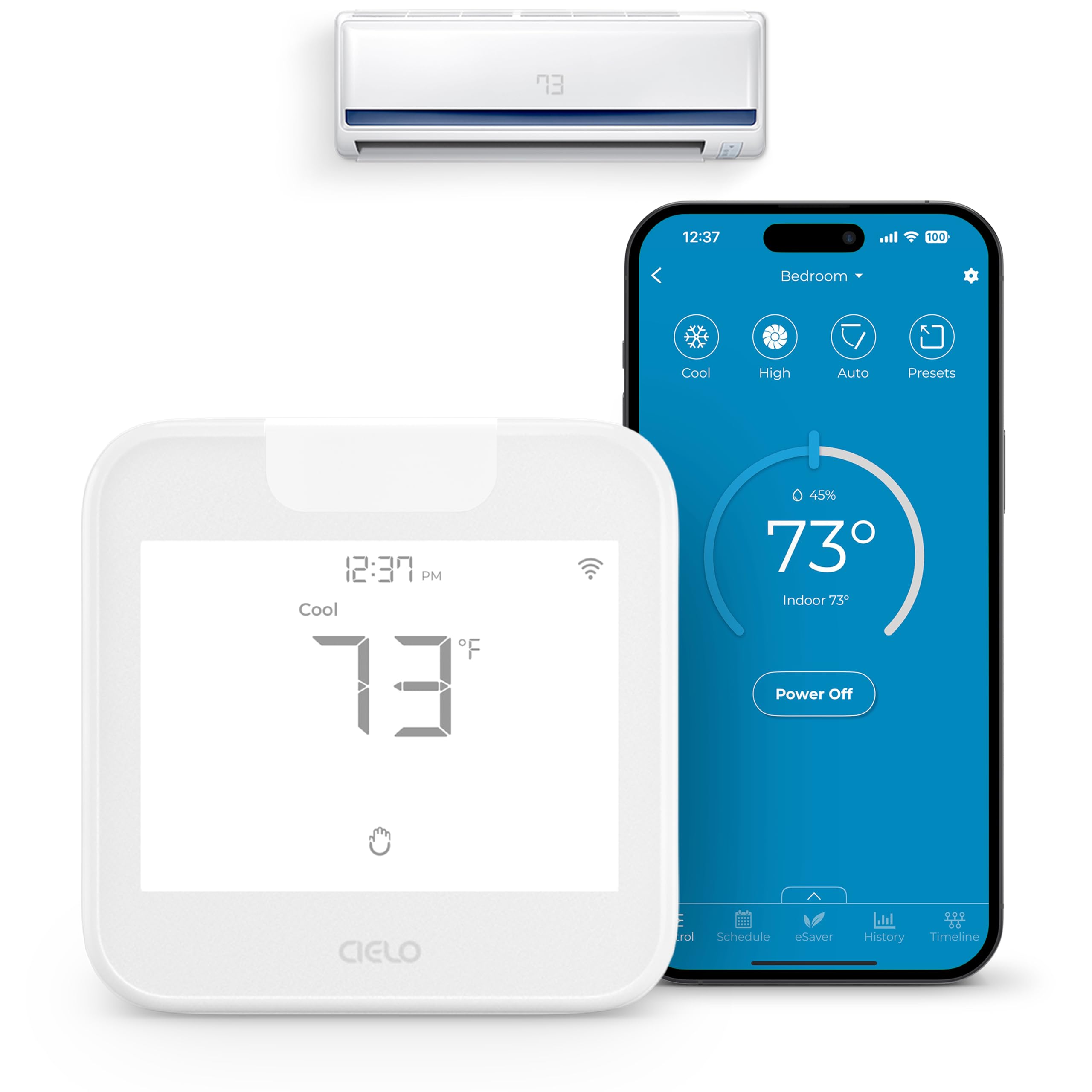
The Breez Max isn't a thermostat you wire into a furnace, and it won't run central air. It's for the other kind of cooling — a mini-split, a window unit or a portable AC with an infrared remote — which it learns by pointing that remote at it during setup. If that's your situation, it's the only thing on this page that helps.

Setup is the good part. You point the old remote at the unit, it identifies the brand and model, and from then on the AC answers to the app. No wiring, no C-wire conversation, and a table stand in the box if you don't want to put it on the wall.

What it adds is everything the original remote can't do: schedules that keep running when the internet drops, geofencing, a temperature reading from the room the device sits in rather than the head unit on the wall, usage history, filter reminders, and Alexa, Google, Siri Shortcuts and Home Assistant. Comfy Max holds a temperature band instead of a single setpoint, which is the right shape for a mini-split that overshoots.

The limits are real and physical. It needs line of sight to the AC's receiver, and it can only do what the original remote could do — if the remote never had a swing setting, neither does the app. We think it's worth it anyway for a bedroom unit you currently walk across the room to adjust; for a whole-house system, it's the wrong tool entirely.

Bottom line: If your cooling comes from a mini-split or a window unit with a remote, the Breez Max turns it into an app-controlled thermostat with no wiring at all.
2

Mysa Smart Thermostat V2

Mysa Smart Thermostat V2

Baseboard heating

Our Score 9.0/10
Check Price

Worth Noting

  • One unit per heating zone adds up
  • Wi-Fi pairing can need a few attempts
Voltage
120-240V
Max Load
3800 W
Heating Types
Electric baseboard, convector, fan-forced
Voice Assistants
Alexa, Google Assistant, Apple HomeKit
Read the full review

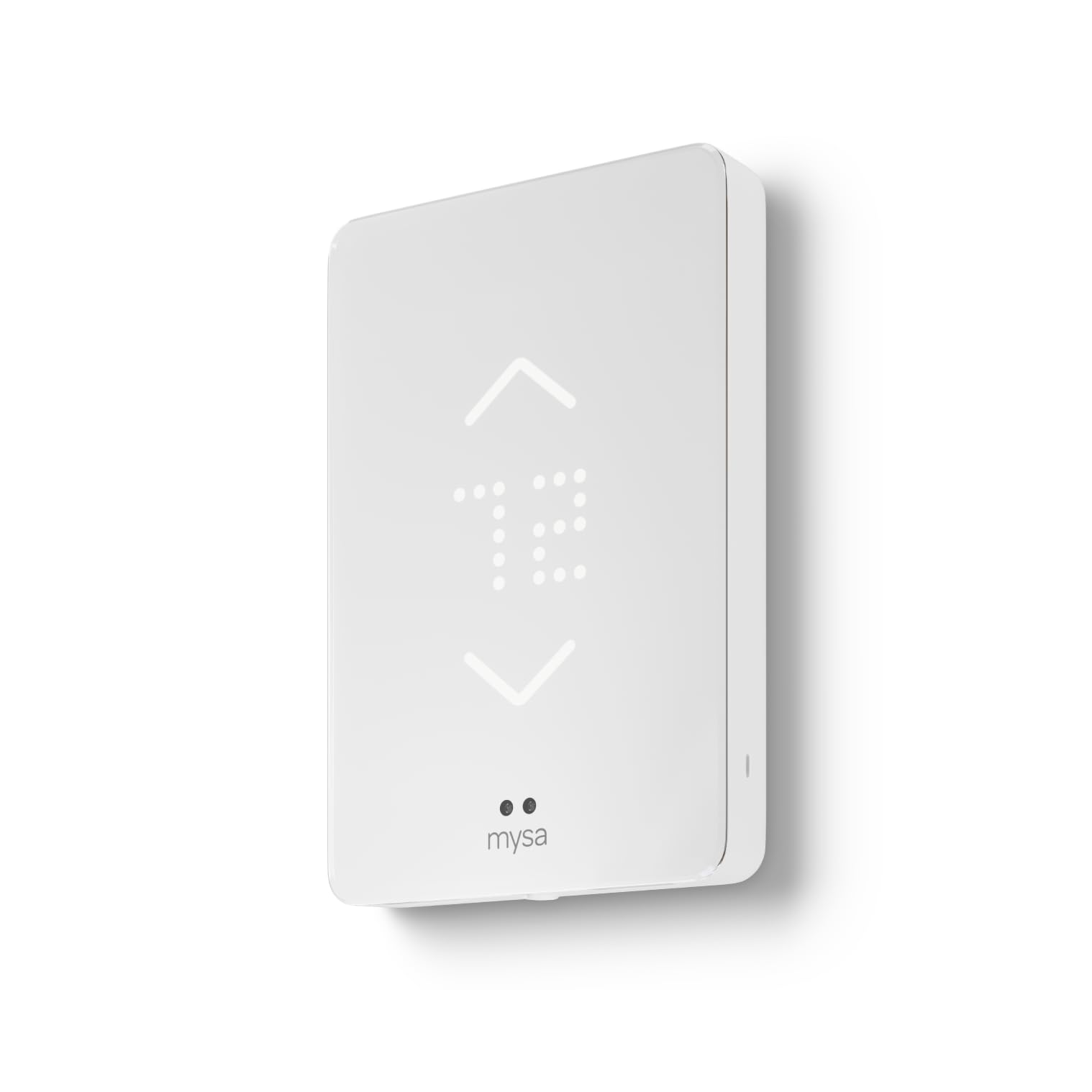
Line-voltage heat is the awkward corner of this market. Baseboard heaters and fan-forced convectors run on 120 or 240 volts, and a 24V thermostat can't control them at all — which is why so many rooms are still stuck with a dial on the wall. The Mysa is built for that circuit, up to 3800 watts, and it brings a baseboard room into the same app as everything else in the house.

Installation is the part to understand before you order. The Mysa needs a neutral or a second live wire in the wall box, and older baseboard circuits don't always have one. Look at the wires first, and stop if there are only two — this isn't a circuit to improvise on, and the breaker stays off until the faceplate is back on.

Once it's running, it does what a baseboard room actually needs: schedules, geofencing, a humidity reading, energy insights, and HomeKit, Alexa and Google support with no subscription behind any of it. The 3.5-inch display is small, but the touch feedback is audible, so you know a press registered without staring at it.

The practical limit is arithmetic — one unit per heating circuit, so a house with four baseboard zones needs four of these, and that adds up even though each one is sensible on its own. For a cabin, a basement or a converted porch, a single unit is an easy yes.

Bottom line: The Mysa is the only pick here for electric baseboard heat, and we think it earns its keep in a room you heat all winter.

3

ecobee Smart Thermostat Enhanced

ecobee Smart Thermostat Enhanced

Most homes

Our Score 8.8/10
Check Price

Worth Noting

  • Some units fail and need replacing
Wiring
C-wire or included PEK
Display
4-inch LCD
Voice Assistants
Alexa, Google Assistant, Apple HomeKit
HVAC Compatibility
About 90% of 24V systems
Read the full review

The most important thing in the ecobee Enhanced's box is a small plastic adapter. The Power Extender Kit lets the thermostat run on a system with no C-wire at the wall, and that's why it's our top pick: plenty of houses never had a fifth wire pulled to the hallway, and this solves the problem in the box instead of with an electrician's visit. A trim plate comes with it too, which covers the paint line left by a larger old unit.

Installation runs through the app, which has you label and photograph the wires before you disconnect anything. That photo is the difference between a calm half hour and a confusing one. ecobee rates the Enhanced for about 90% of 24V systems and publishes a compatibility checker; run it before you order, because heat pumps are where this model draws the most disagreement.

Day to day, the occupancy sensing is what we noticed. The house drifts while nobody's home and comes back to temperature before you arrive, and after a week you stop managing it. The 4-inch LCD is plain next to the Nest's polished circle, and that's fine — this is a thermostat you mostly operate from your phone.

Auxiliary heat is the one behavior worth watching. On some systems it comes on below roughly 35°F sooner than the outdoor temperature suggests, which on a heat pump in a cold climate is worth a month of attention before you trust the savings claim. Some units also fail outright, which is the pattern to weigh against the three-year warranty.

Bottom line: We recommend the ecobee Enhanced for most homes: it includes the adapter that gets it running without a C-wire and adjusts around occupancy instead of a fixed schedule.

4

Sensi ST55

Sensi ST55

Tight budgets

Our Score 8.8/10
Check Price

Worth Noting

  • Wi-Fi connections can drop and need reconnecting
Wiring
C-wire not required
Display
5-inch LED
Warranty
3 years
Voice Assistants
Alexa, Google Assistant, Apple HomeKit, SmartThings
Read the full review

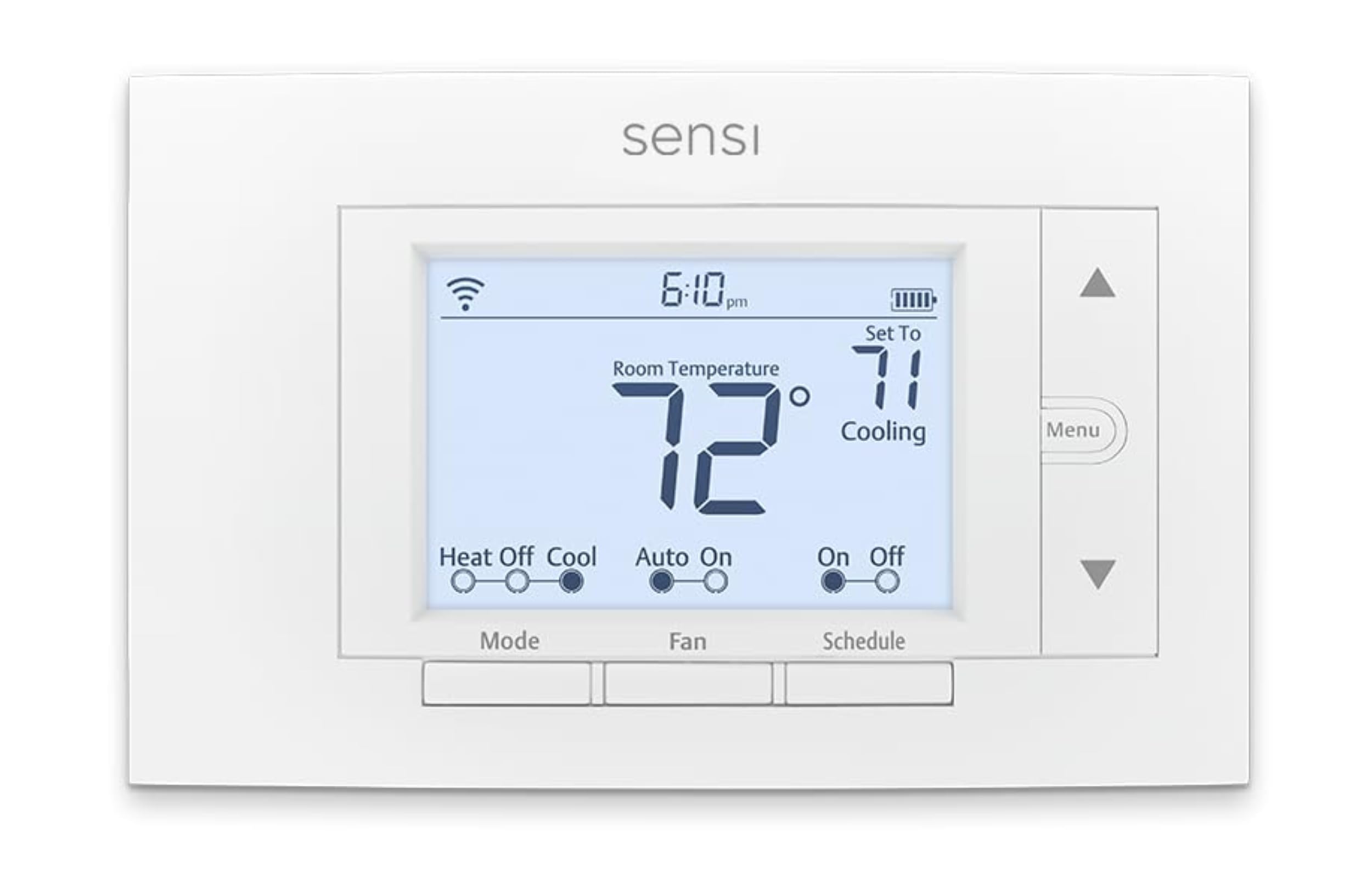
The Sensi ST55 is the cheapest way into a genuinely smart thermostat, and it doesn't announce the fact. It's a white rectangle with physical buttons, sized to sit in the same footprint as the thermostat it replaces, so there's no patching and no painting. An upgrade that doesn't turn into a drywall project is worth something.

It also runs without a C-wire in most homes, which at this end of the range is the unusual part. Installation is a screwdriver job with a built-in level on the backplate and step-by-step guidance in the app, and we liked how little ceremony there is: no account juggling, no hub, no subscription.

What you get is deliberately plain — scheduling, remote access, usage reports, filter reminders, and Alexa, Google Assistant, Apple HomeKit and SmartThings support. What you don't get is a touchscreen or any learning. We ended up preferring the buttons: a guest can walk up and change the temperature without a tutorial.

The longer-term risk is the part we can't wave away. These Sensi units are the least reassuring in this group over a couple of years, with failures that arrive well before a thermostat should. The three-year warranty covers you, but a warranty doesn't heat the house in February.

Bottom line: Buy the Sensi ST55 if the budget decides and your wall has no C-wire; we think it's the least risky way to get scheduling and voice control for the least money here.

5

Honeywell WiFi 9000

Honeywell WiFi 9000

Wall-first scheduling

Our Score 8.8/10
Check Price

Worth Noting

  • Needs a C-wire, with no adapter in the box
  • Touchscreen presses sometimes need repeating
Wiring
C-wire required
Display
4.5-inch color touchscreen
Scheduling
7-day programmable
Voice Control
Alexa
Read the full review

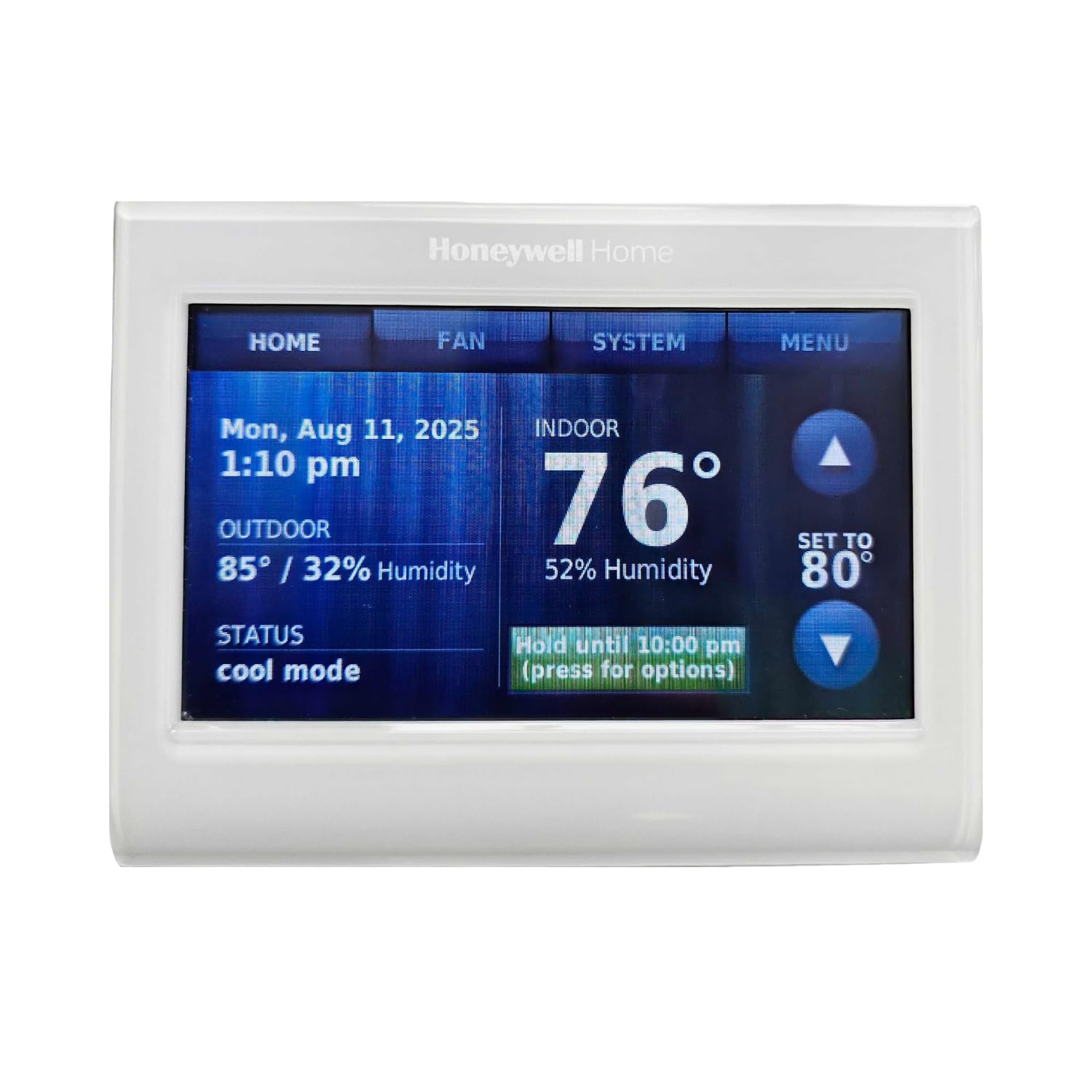
A 4.5-inch color touchscreen showing indoor temperature, outdoor temperature and humidity is the whole argument for the Honeywell 9000. It's the one here that reads like a small control panel rather than a puck, and everything — schedule, fan, hold — lives on the glass instead of three menus into an app.

The screen is customizable, down to background color and which readings get displayed, and the brightness adjusts if the hallway version is glaring at two in the morning. Alerts and reminders surface both on the display and in the app, which sounds minor until a filter reminder arrives before the system starts straining.

Underneath it's a conventional seven-day programmable thermostat with the Total Connect Comfort app and Alexa, and we think the hardware is the most legible wall experience in this set — a claim with one big caveat attached. It needs a C-wire, and Honeywell lists it as unsuitable for dual-fuel heat pumps without a fossil kit. Read that line before you buy, because it's an exclusion the maker states outright rather than one you discover mid-install.

If your system qualifies, you get a thermostat a whole household can run without a phone: touch a day, drag a setpoint, done. The app is the oldest-feeling interface in this group, and the value question is real when the Sensi does the same core job — but the Sensi doesn't look like this on the wall.

Bottom line: Our pick for a thermostat the whole household can work without a phone: the Honeywell 9000 puts schedules and outdoor weather on a big color touchscreen.

6

Google Nest Learning Thermostat 4th Gen

Google Nest Learning Thermostat 4th Gen

Design-led homes

Our Score 8.8/10
Check Price

Worth Noting

  • Google Home app only; the Nest app is gone
Wiring
No C-wire needed in most homes
Certification
Matter
Included Sensor
Nest Temperature Sensor (2nd gen)
Voice Assistants
Alexa, Siri, Google Assistant
Read the full review

Polished gold, a display 60% larger than the outgoing model, and a bezel that picks up the room: the fourth-generation Nest Learning Thermostat is the only one here people will comment on. Whether that's worth paying for depends entirely on where it hangs. A wall you pass twenty times a day, yes. The back of a closet door, no.

The bigger screen does work. Dynamic Farsight shows the time, weather or temperature from across the room, so you stop walking over to squint at it, and the body is aluminum rather than plastic. The box also includes a Nest Temperature Sensor, which solves the classic problem: the hallway where the thermostat lives is never the room you're trying to keep comfortable.

It's Matter certified and speaks to Alexa, Siri and Google Assistant, which is broader voice support than most of this set. What it won't do is talk to the old Nest app — everything runs through Google Home now, and if you're upgrading from an earlier Nest expecting the same app, that's the surprise waiting for you.

Learning is the headline, and it's the part we're least convinced by. The occupancy behavior and the included sensor are what actually change how a room feels; the algorithm noticing your weeknight habits is a slower, subtler thing. Watch the accuracy too — these can read a couple of degrees off, so put the sensor where you sit rather than trusting the number on the wall.

Bottom line: We recommend the Nest Learning Thermostat for the house where the thermostat is on display — it's the best-looking unit here and it comes with a room sensor.

7

Sensi Touch ST75

Sensi Touch ST75

Touchscreen upgrades

Our Score 8.8/10
Check Price

Worth Noting

  • Requires a C-wire; no adapter included
Wiring
C-wire required
Display
4.3-inch color touchscreen
Warranty
3 years
Voice Assistants
Alexa, Google Assistant, Apple HomeKit, SmartThings
Read the full review

The Sensi Touch ST75 is the ST55 with a 4.3-inch color touchscreen and a C-wire requirement, and that trade is the entire decision. Appearance is what this model does best in the set: the black finish and backlit color display look deliberate on a painted wall in a way the button model doesn't, and the temperature reads from across the room.

Everything else is the family recipe: the same app, the same Alexa, Google Assistant, Apple HomeKit and SmartThings support, the same guided install with illuminated terminals, and a three-year warranty. The illuminated terminals matter more than they sound — wiring a thermostat in a dim hallway is where most do-it-yourself installs go sideways.

The catch is the C-wire. The ST75 requires one and doesn't adapt around its absence, so a four-wire wall turns this into an electrician job and makes the cheaper ST55 the better buy. With five wires, you're paying more for a nicer wall interface over the same software, and that's a fair trade for a hallway you look at every day.

Bottom line: Choose the Sensi Touch ST75 if you want the ST55's simplicity with a color touchscreen and you can confirm a C-wire at the wall.

8

Honeywell Vision Pro 8000

Honeywell Vision Pro 8000

Multi-stage systems

Our Score 8.8/10
Check Price

Worth Noting

  • Requires a C-wire; no adapter supplied
Wiring
C-wire required
Warranty
5 years with professional installation
Voice Control
Alexa
Stages Supported
Up to 3 heat / 2 cool
Read the full review

If your system is more complicated than a single-stage furnace, this is the one to look at: the Vision Pro 8000 handles up to three stages of heat and two of cooling, more than anything else here. It's also the most installer-shaped product in the set — a plain square face, a modest screen, and a five-year manufacturer warranty that's conditional on proof of professional installation.

That condition is the thing to read twice. Do it yourself and you're relying on the seller's one-year coverage instead of Honeywell's five, on a unit that assumes someone who does this weekly. We think that math is straightforward: if you're already paying someone to commission a multi-stage system, the long warranty is free; if you're not, buy one of the simpler units and keep the money.

What the extra complexity buys is control — remote access from the phone, Alexa, humidity and dehumidification settings, and air circulation, on a device that keeps running its program locally when the network doesn't. Reliability is among the steadier results in this group, and the plain face is the reason it disappears into a hallway instead of starting a conversation.

Bottom line: We point multi-stage and light-commercial systems to the Vision Pro 8000: it handles up to three heat and two cool stages and takes a pro-install warranty.

What Ten Months With 12 Smart Thermostats Taught Us

We started with the roughly 40 models sold by major retailers and cut anything that couldn't handle common setups — a two-wire house, a heat pump, a multi-stage system — along with units whose companion app hadn't been updated in a year and models that locked basic scheduling behind a subscription. That left 12, which we bought at retail and installed ourselves.

Install day got its own scorecard. We killed the breaker, photographed the old wiring, and timed each install solo, noting whether the app walked us through labeling wires or left us guessing. Two of the 12 needed an adapter to run in a house without a C-wire, one never paired with a two-wire setup and came back out, and one arrived dead in the box, which we counted against it.

Then we just lived with them. Ten months covered weekday morning warm-ups, overnight setbacks, a week away in July, and a January cold snap. We logged whether the room held the setpoint within a degree using a separate thermometer, whether schedules survived a power blip, and whether the app reconnected on its own after we rebooted the router. We counted how many taps it took to raise the heat two degrees, and whether a guest could manage it without being told.

What each one cost came last, but it mattered. We weighed price against what we actually used from day to day — more than one learning mode got switched off in week two and never came back on, which made the simpler models look like the better value.

How to Choose Smart Thermostats

Start at the wall plate, not the feature list

Most 24V thermostats run on four wires, and a fifth — the C-wire — supplies steady power. Some units require it, some adapt around its absence, and a few ship the adapter in the box: the ecobee Enhanced includes a Power Extender Kit and the Sensi ST55 simply runs without one. If you have five wires, the whole field opens up; if you have four, start by sorting the models that solve it for you.

The trap is the phrase 'works with most systems'. That is not a statement about your system. Run the maker's compatibility checker with your equipment's model numbers before you order, and photograph the old wiring before anything is disconnected — that photo is what gets you back if a wire label goes missing.

Match the thermostat to what actually heats and cools the house

A single-stage gas furnace is the easy case and almost anything here will run it. Heat pumps need a unit that handles auxiliary and emergency heat properly. Multi-stage equipment narrows things further — the Honeywell Vision Pro 8000 covers up to three heat and two cool stages, more than anything else in this set.

Then there are the systems a standard thermostat cannot touch at all. Electric baseboard and convectors run on line voltage, which is what the Mysa is built for, and a ductless mini-split or window unit is usually controlled by an infrared remote, which is where the Cielo Breez Max comes in. Buying a 24V thermostat for either of those is money spent on the wrong product.

Occupancy beats learning, and a schedule beats both

The savings in this category come from not conditioning an empty house, not from an algorithm studying your habits. Occupancy sensing — as on the ecobee Enhanced and the Nest Learning Thermostat — is the feature that actually does that work, and it suits households whose weeks are irregular.

If your week is predictable, a plain seven-day schedule on a cheaper thermostat gets most of the way there. Look for Energy Star certification if you plan to chase a utility rebate, and treat the headline percentage savings as a ceiling rather than a forecast.

Decide who has to operate it

A thermostat that only exists in an app is a problem the first time the Wi-Fi drops, or the first time a visitor is cold. Units with real controls on the wall — the Honeywell WiFi 9000's color touchscreen, the Sensi ST55's buttons — keep working when the network doesn't, and they spare you explaining an app to a houseguest.

Wi-Fi trouble is the most common complaint across this whole set, so it's worth putting a mesh node or access point within range of the hallway before you blame the thermostat. A strong 2.4 GHz signal at the wall prevents most of the reconnection stories.

Frequently Asked Questions

Final Verdict

The ecobee Smart Thermostat Enhanced is the one we point most people to. It solves the C-wire problem in the box, it adjusts around an empty house rather than a rigid schedule, and it works with all three major voice ecosystems — no other pick here covers that much ground at once.

If the budget is the constraint and the wall has four wires, the Sensi ST55 does the same core job for far less. And if your heat is baseboard, skip both: the Mysa is the only thing here built for that circuit.