A gaming desk should be a focal point of your room, not a cluttered mess of worn-out peripherals. Yet many mouse pads start fraying within a year, adhesive clips lose their grip, and RGB lighting dims into a sorry glow — making your setup look more garage sale than battlestation.
The good news? A handful of simple, thoughtfully chosen accessories can keep your desk looking sharp and functioning flawlessly for years. The key is knowing which features actually hold up: stitched edges on pads, reliable power delivery on stands, and silicone clips that stay stuck. This guide sorts the durable finds from the quickly disappointing ones, so you can assemble a gaming desk that remains both organized and attractive.
We've focused on accessories that add to your desk's aesthetic rather than subtract — ergonomic wrist rests in clean designs, polished headphone stands that double as charging hubs, and mouse pads that complement your setup rather than cheapen it. Every pick here prioritizes longevity over marketing flash.
- Key Material: Textile, rubber base
Check Price
Pros
- Anti-fray stitched edges prevent the unravelling that kills most cloth pads
- Smooth surface provides consistent glide for gaming and office tasks
- Non-slip rubber base keeps the pad planted during intense play
Cons
- 11.8-inch depth may feel cramped if you rest a full keyboard and mouse with extra arm room
- 2.5mm thickness offers less wrist cushioning than thicker pads
The Corsair MM300 wraps its cloth surface in anti-fray stitching, addressing the most common point of failure on gaming pads. The weave delivers a consistent glide that works for both precise FPS tracking and general office cursor work, while the rubber base grips firmly enough to resist shifting during wide mouse sweeps.
This pad suits gamers and mixed-use workers who want a reliable, no-frills daily driver. The 11.8-inch depth fits a mouse plus a tenkeyless keyboard comfortably, but anyone wanting to rest their full keyboard and mouse with extra room should measure their desk first — a deeper pad like the MM350 Pro offers more space and thicker cushioning.
Bottom Line: If you want a cloth mouse pad that outlasts cheaper alternatives and don't need full-desk coverage, the MM300 is the right pick.

- Key Material: Micro-woven cloth, rubber
Check Price
Pros
- Sprawling 35x16-inch surface accommodates your full keyboard and mouse with room to spare.
- Micro-woven cloth enables a fast, consistent glide that optical sensors track precisely.
- Non-slip rubber base stays planted even during aggressive, wide swipes.
Cons
- Edges can start to fray after extended heavy use because the design omits protective stitching.
The SteelSeries QcK XXL covers a full 35x16 inches of your desk with a fast micro-woven cloth surface that delivers consistent sensor tracking—no stitched edges in sight, unlike the top pick. That design choice sacrifices edge durability: non-stitched edges can begin to fray after a year of regular gaming, making the pad a performance consumable rather than a forever mat. It’s the right call for competitive players who prioritize sweeping desk coverage and speed over long-term edge integrity, and are willing to replace it every 1–2 years.
Bottom Line: For full-desk coverage at this price, the QcK XXL delivers esports speed that’s hard to match; just budget for a replacement when the edges wear.
- Key Material: Spill-proof cloth, rubber
Check Price
Pros
- Spill-proof coating repels liquids and wipes clean effortlessly.
- Silky smooth glide combined with 4 mm plush comfort reduces wrist strain.
- Extended size fits a full keyboard and oversized mouse movements.
Cons
- Costs more than non-spill-proof extended pads of similar dimensions.
- Controlled texture can feel slow to players accustomed to speed-oriented cloth.
The spill-proof micro-weave cloth actively repels liquids and wipes clean, a practical benefit absent from the top pick’s focus on edge stitching. Its 4 mm rubber base cushions wrists during long sessions, while the 36.6-inch wide surface fits a keyboard and mouse with room to spare.
The controlled glide texture prioritizes precision over effortless speed; competitive FPS players who prefer slick, low-friction cloth may find it slow. Stitched edges add long-term durability, and the mid-range price sits above non-spill-proof pads of equal size. This pad is for desk diners who value spill security and plush support more than a speed-oriented glide.
Bottom Line: The spill-proof coating and plush comfort make it ideal for gamers who eat or drink at their desk, as long as you’re willing to trade slick speed for precision tracking.
- Key Material: ABS plastic, aluminum
Check Price
Pros
- Frees desk space by combining headphone storage, 20W USB-C PD fast charging, and two AC outlets into one unit.
- Aluminum pole and non-slip base support heavy gaming headsets without wobbling or tipping.
- Consolidates cable clutter and adds charging convenience at a budget-friendly price.
Cons
- Charging multiple USB devices at once divides the shared power output, reducing speed for each.
Unlike basic headphone stands that only hold a headset, the COZOO stand integrates 20W USB-C Power Delivery, two AC outlets, and a sturdy aluminum hook into a single desk tool. The non-slip base and aluminum pole keep heavy gaming headsets secure, and the 1250W outlets can power monitors or laptop chargers—replacing a separate power strip and USB hub to free up workspace.
This stand suits gamers who want to charge controllers, phone, and headset right on their desk without cable clutter. The USB ports share a total power budget, so charging multiple devices at once will be slower; the stand works best when you fast-charge one device and trickle-charge a second accessory.
💡 Tip: Use the USB-C port solo for full 20W PD speed; charge gamepads or wireless headset dongles via the USB-A ports when speed isn’t critical.
Bottom Line: For a desk short on space and outlets, this stand combines fast charging and sturdy headphone storage without the bulk of a separate power strip—just don’t expect it to quickly charge a tablet and a phone simultaneously.
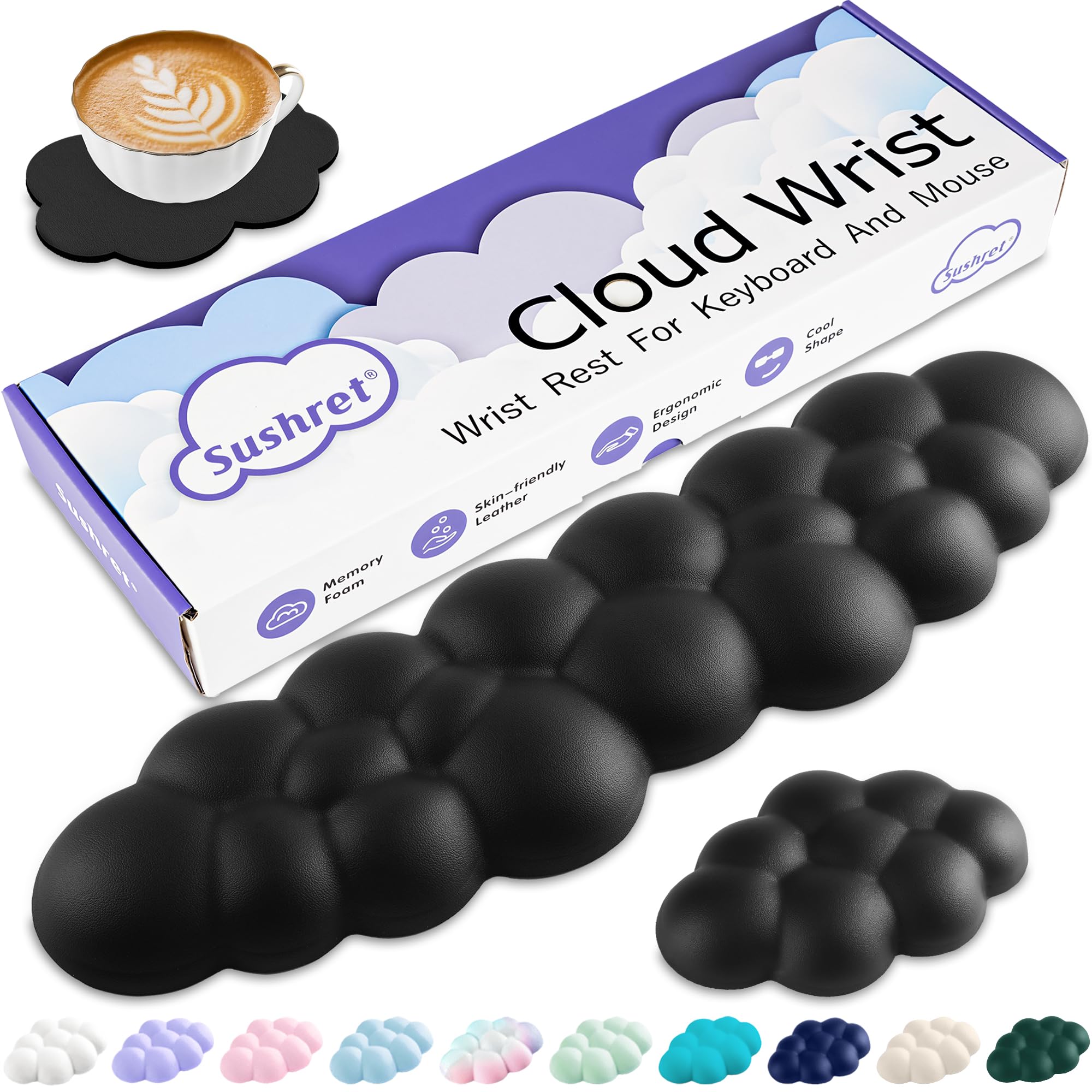
- Key Material: Memory foam, PU leather
Check Price
Pros
- Eases wrist pressure noticeably during extended use.
- Charming cloud shape that ties a desk theme together.
- Memory foam and PU leather resist flattening.
Unlike firmer gel pads, this set uses sculpted memory foam to ease pressure during long sessions—gamers and remote workers with wrist strain will feel the difference immediately. The cloud design and matching keyboard rest, mouse rest, and coaster bring a cohesive aesthetic without sacrificing function. Light-colored versions can show smudges over time, but the PU leather wipes clean easily. This is the pick for anyone who values ergonomic comfort and a cute desk personality.
💡 Tip: Light-colored surfaces may show dirt quickly but clean up in seconds with a damp cloth.
Bottom Line: A comfortable, whimsical upgrade for anyone whose wrists need relief without sacrificing a coordinated, cheerful setup.
- Key Material: Alloy steel, ABS, wheels
Check Price
Pros
- Quick snap-together assembly and width adjustment fits most mid-tower to full-tower cases.
- Locking casters roll smoothly across carpet and hard floors, making PC repositioning effortless.
- Keeps tower stable and raised up to 3 inches for improved airflow and dust protection.
Cons
- Plastic components add flexibility rather than rigidity, and the wheel locks can give way on thicker carpet piles.
The YOSE stand sets itself apart by combining an adjustable width with locking casters that actually roll on carpet — a rare combination at this price. It’s built for gamers who want an easy way to raise their rig off the floor for dust protection and quick cleaning access, especially on carpeted desks. The plastic build reflects the cost: parts can flex, and the wheel locks are not foolproof on thick carpet. This is a mobility tool, not heirloom furniture, so owners who don’t mind the material tradeoff will find it functional.
💡 Tip: On deep carpet, test wheel lock engagement after positioning; a slight shift in tower weight can help the locks dig in.
Bottom Line: For carpeted setups where moving the PC is a regular chore, this stand provides essential lift and mobility without a hefty price — just accept that the build is utilitarian, not premium.
- Key Material: Steel, PVC top
Check Price
Pros
- Sturdy Z-shaped steel frame holds multiple monitors and heavy gear.
- Spacious desktop includes an integrated rack, cup holder, headphone hook, and full-coverage mouse pad.
Cons
- Desk can wobble on uneven floors unless perfectly leveled and tightened.
The desk bundles a spacious 55.1 x 21.5-inch surface with gaming add-ons, avoiding the need for separate accessory purchases. Assembly instructions can be unclear, making alignment a test of patience for first-time builders. This is a full desk, not a peripheral accessory, so it sits outside the core focus of this guide.
Bottom Line: A sensible pick for gamers assembling their first setup who want built-in gear without shopping for separate accessories, provided they can level the floor and work through vague instructions.
- Key Material: Humidity-resistant cloth, rubber
Check Price
Pros
- Premium cloth surface provides smooth, controlled glide for precise FPS aim.
- Humidity-resistant material maintains consistent glide in damp environments.
Cons
- Edges may fray over time due to the lack of stitched edging.
The BenQ Zowie G-SR-SE delivers a smooth, controlled glide that competitive FPS players appreciate, and its humidity-resistant cloth keeps performance from getting sluggish in damp air. However, without stitched edges, fraying may appear over heavy use, and the 18.5x15.4-inch pad is too small for a full-desk layout—narrowing its role to a dedicated mouse-only surface.
Bottom Line: For competitive FPS players in humid climates who replace pads annually and don't need desk coverage, this pad's controlled surface justifies the trade-off.
Pros
- Tidies messy cables in seconds with no tools or drilling
- Self-adhesive backing allows easy repositioning on different surfaces
Cons
- Adhesive may leave residue behind or lose grip on textured surfaces over time
Three silicone slot sizes bring quick order to stray charging cables, earbuds, and thin PC cords. Adhesive strength can vary with surface texture, and cords over 6mm may slip out. For light-duty desk tidying, they’re a handy accessory, but they’re not a core desk essential.
Bottom Line: A practical, no-drill option for light-duty wire clutter if you’re willing to work around adhesive variability.
- Key Material: Hardened plastic, rubber
Check Price
Pros
- Versatile storage for both headset and multiple controllers
- Sturdy base and rubber pads prevent tipping and desk scratches
Cons
- Lightweight plastic build and lack of USB charging ports limit its use as a powered desktop hub.
The KDD stand keeps gaming gear off the desk with a 360° swivel headphone hook and detachable controller hooks, while nine RGB modes add personality. The all-plastic body can feel light, and there are no USB charging ports — a trade-off for the price. It’s a solid organizer for controller collectors who don’t need powered extras.
Bottom Line: For gamers with multiple controllers who want a simple, colorful display stand — and don’t need USB charging — this is an affordable way to declutter.
- Key Material: Aluminum, rubber base
Check Price
Pros
- Chroma lighting syncs with other Razer devices for a unified desk aesthetic.
- Integrated 7.1 surround DAC outputs virtual spatial audio from the 3.5mm combo port.
Cons
- No user-submitted reviews exist to confirm long-term reliability of the DAC or Chroma lighting
Chroma RGB sync and a built-in 7.1 surround DAC elevate this aluminum stand beyond mere headphone storage. Without user reviews to verify long-term durability, you’re betting on Razer’s build quality. This suits those deep in the Synapse ecosystem who don’t need extensive community feedback before buying.
Bottom Line: This stand fits a desk already populated with Razer gear, where you value synchronized lighting and a cleaner audio path more than verified long-term reliability.
- Key Material: Micro-textured cloth, rubber
Check Price
Pros
- Vibrant RGB lighting with 14 modes brightens any desk setup.
- Large waterproof surface provides smooth tracking at a low cost.
Cons
- RGB lighting can lose brightness or develop dead zones over time.
Fourteen lighting modes and a waterproof cloth surface that resists spills make this pad a desk standout for under $15. The RGB LEDs can dim or develop dead zones after months of use, which keeps it from being a long-term solution for consistent lighting.
Bottom Line: A fun addition to a budget setup where the initial lighting spectacle matters more than years of consistency, and the spill-proof surface adds everyday practicality.